1. Make exactly 24
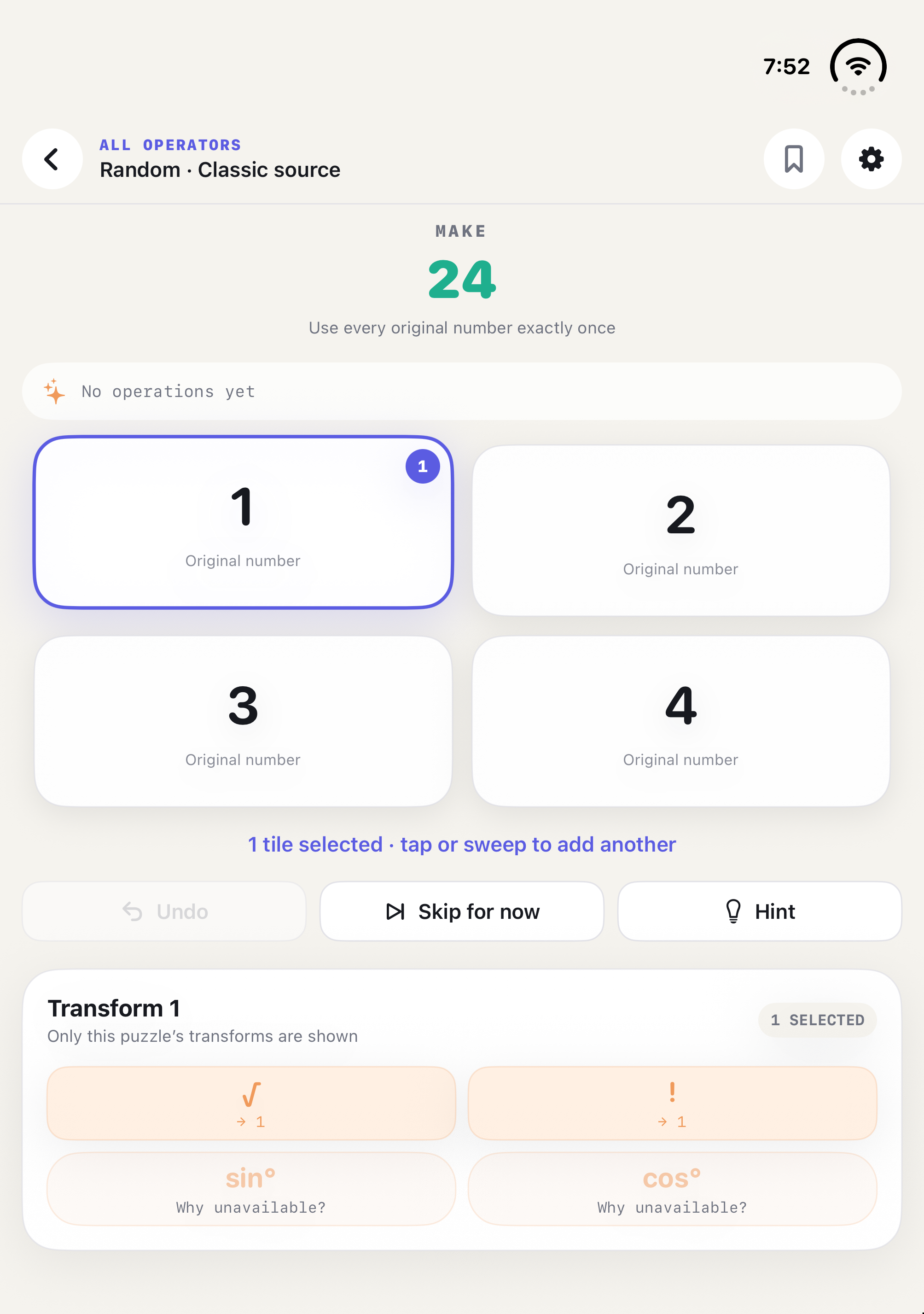
Use every original number exactly once. Select one tile for a transformation such as √ or !. Select two tiles for +, −, ×, or ÷; the operator tray shows the actual operand order.
Support
24++ works offline for free puzzles and stores progress and preferences on your device. These answers cover the most common questions.
Gameplay guide
Use every original number exactly once. Select one tile for a transformation such as √ or !. Select two tiles for +, −, ×, or ÷; the operator tray shows the actual operand order.
Tap tiles one at a time, or keep your finger down and sweep through the tiles you want. Selected tiles show operand 1, 2, 3, or 4. A straight diagonal selects the two diagonal endpoints; draw a clear bend into a side tile when you want to include it. Sweeping only adds selections, so tap a tile to correct or remove it.
Turn on Multi-Select Operations in Settings to select up to four tiles. After selecting three or four, tap +, −, ×, or ÷ once. The app calculates in selection order: selecting 8, 3, 2 and then − makes (8 − 3) − 2; ÷ works the same way. One Undo restores the whole chain. When the setting is off, you can select at most two tiles.
Version 1.0.2
Play on the outer or inner display, in portrait or landscape. Rotate or unfold during a puzzle to keep working on the same calculation. Select tiles, read their selection order, then choose an operator; Undo restores the previous step. In a short landscape window on iPhone Duo, the four number tiles form one row, with operators below the tiles. Sweeping across tiles still selects them.
TestFlight guide
Open your existing invitation in TestFlight, install or update 24++, and check the version and build number on its TestFlight page. Availability depends on Apple processing and the invitation for your existing group. These are the planned 1.0.3 builds; an App Store release is separate.
Practice in Classic, Transform, and Trig. Solo Time Trial and Race Lab are off.
Practice and Solo Time Trial. Race Lab is off. Use your existing Beta invitation.
Practice, Solo Time Trial, and experimental Race Lab. Use your existing internal Alpha invitation. Real two-account FaceTime invitation, connection, and cross-device consistency checks remain unverified.
Choose Solo Time Trial on the home screen, choose a lab, and press Start. The 3 · 2 · 1 · GO countdown reveals the challenge and starts the timer. Make exactly 24 using every number; the header shows time and Player Moves. Results show time, Player Moves, Math Operations, and Undos. For a three-card chain, one operator press is one Player Move and two Math Operations; Undo does not refund a Player Move.
Hints and worked answers mark a run assisted, so it cannot update a Personal Best. Restart begins a new countdown; leaving the app during a running trial interrupts that run. Eligible exact solves can update separate Fastest and Fewest Moves records for the same challenge and rules. Solo records and Personal Bests stay on this device, outside progress sync; deleting the app removes local app data.
For the experiment, use two participants with different FaceTime accounts. Start a FaceTime call, open Race Lab, start or join SharePlay, and wait until both participants are joined before choosing Ready. After the shared countdown, solve the free Classic challenge with normal tile operations. Read the verified result or explicit No Contest message; start a fresh sprint or exit. This does not update Practice progress or Solo Personal Bests. The unverified real-device connection checks above are part of Alpha feedback, not a promise of multiplayer readiness.
Check all four digits and their tap areas before selecting, then with one, two, and three tiles selected on both displays and orientations. Confirm the operator tray does not cover a tile; try an operation and Undo after unfolding. Alpha/Beta testers should repeat this in Solo Time Trial. Send the build number, device, display/orientation, selection count, and reproduction steps through TestFlight feedback or the support email below. A screenshot is helpful; omit private call details.
Common questions
Hints reveal progressively. If Allow Full Answer is enabled in Settings, the verified worked answer becomes available after all hints. Viewing it marks that solve as assisted.
Open the Full Lab purchase screen and choose Restore Purchases. Use the same Apple Account that bought Full Lab. A network connection may be needed while Apple verifies the entitlement.
Full Lab supports Apple Family Sharing. Family members must belong to the same Apple family group, have purchase sharing configured by Apple, and use a storefront where the item is available.
Open Settings to choose System, English, Simplified Chinese, Traditional Chinese, or Japanese, and Automatic, Day, or Night appearance. Changes apply immediately and stay on this device.
24++ stores your game progress and preferences locally on your device. When your devices use the same Apple Account in iCloud, completed progress, best operation counts, assistance status, bookmarks, and skipped puzzles also synchronize through Apple's iCloud key-value storage. Small logical counters and a random device identifier are used only to merge changes. The developer does not operate a server or receive access to your personal iCloud puzzle data. Apple processes iCloud data under its own terms and privacy policy.
Language, appearance, gameplay settings, recently opened locations, and calculations in progress stay on each device. Synchronization may take time; you can keep playing offline and changes can merge when iCloud becomes available. It is not a backup service. Deleting the app removes local app data but does not guarantee removal of iCloud data; synced progress may return on another device or after reinstalling. The developer cannot retrieve or erase your personal iCloud puzzle data for you. Version 1.0 stores game progress locally without this sync feature.
Open Library from the home screen to find Saved bookmarks and Skipped puzzles across all labs. Use Skip on a puzzle board to put an unfinished puzzle aside; use Remove to stop skipping it. Automatic next/continue/random choices exclude skipped puzzles, but you can open them directly from Library. Solving one clears its skipped status and keeps its bookmark. Multi-Select Operations is on by default for new installs; existing explicit preferences are preserved.
Version 1.0.1 and later include 72 free puzzles: 24 per lab, using numbers 1–13. Version 1.0 includes the original 24 free puzzles. Full Lab remains an optional one-time purchase for the complete bank and future bank updates, with Family Sharing and Restore Purchases through Apple.
Email support@24plusplus.henryzy.com. Include your device model, iOS or iPadOS version, app version, and steps to reproduce. Do not include passwords or payment details.